How to calculate lot size for forex and gold, with examples
The lot size decides how much you lose when your stop is hit. Here is the simple way to work it out for forex pairs and gold, with real numbers.
Most traders spend hours on entries and almost no time on lot size. Yet the lot size is the one number that decides how much a losing trade costs you. Two traders can take the exact same trade, with the same entry and the same stop, and one loses 1% of the account while the other loses 10%. The only difference is the lot size.
This guide shows the simple method professionals use, with worked examples for EURUSD and gold.
Start from the money, not the lot
The usual mistake is to choose a lot size first, for example 0.10 because it "feels right", and then place the stop wherever it fits. Work the other way round:
- Decide how much of the account you are willing to lose if the stop is hit. Many traders use 0.5% to 2%.
- Place the stop where the trade idea is wrong, based on the chart, not on the money.
- Then calculate the lot size that makes the stop cost exactly your chosen amount.
That way every trade risks the same share of your account, whatever the stop distance. A trade with a wide stop simply gets a smaller lot.
The formula
The money at risk is your account balance (or equity) multiplied by your risk percentage. The stop distance is how far the stop is from the entry. The value per lot depends on the symbol your broker offers.
Example 1: EURUSD
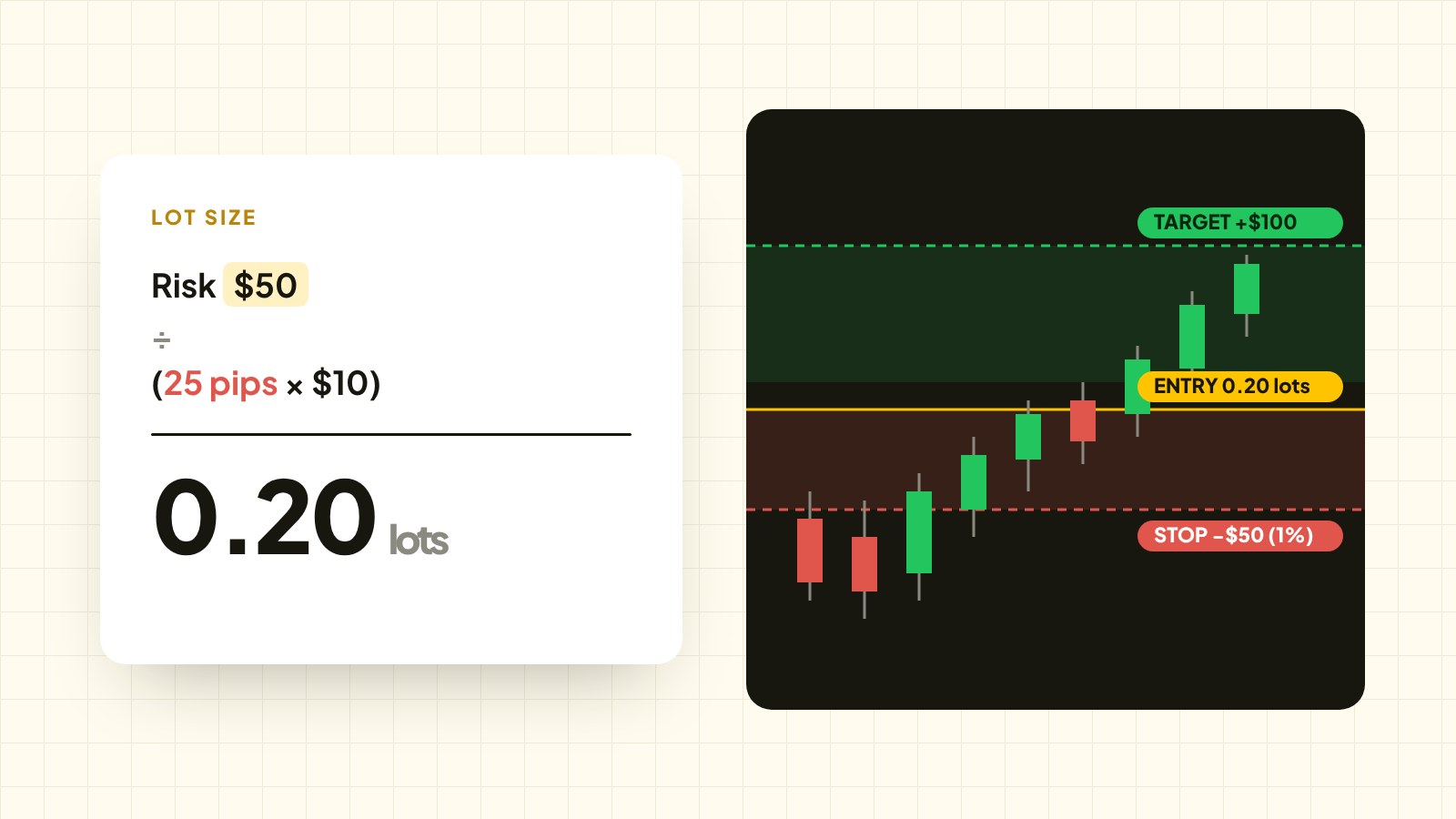
You have a $5,000 account and you risk 1% per trade, so the money at risk is $50.
Your stop is 25 pips away. On EURUSD, one standard lot (1.00) is worth about $10 per pip.
- Loss per lot at the stop: 25 pips × $10 = $250
- Lot size: $50 ÷ $250 = 0.20 lots
If the stop is hit, you lose $50, which is 1% of the account. If you had used 0.50 lots on the same trade, the loss would have been $125, two and a half times your plan.
Example 2: gold (XAUUSD)
Gold works differently because it is quoted in dollars, not pips. At most brokers one lot of gold is 100 ounces, so a $1 move in price is worth $100 per lot.
Same $5,000 account, same 1% risk, so $50 at risk. Your stop is $8 below the entry.
- Loss per lot at the stop: $8 × $100 = $800
- Lot size: $50 ÷ $800 = 0.0625, rounded down to 0.06 lots
Always round the lot down, never up. Rounding up means risking more than you planned.
Notice how small the lot is compared with EURUSD. Gold moves much more in dollars per day, so the same risk needs a much smaller position. This is where many new gold traders get hurt: they trade gold with the lot size they use on EURUSD.
Why the symbol settings matter
The value per lot is not the same at every broker. Contract sizes, account currency and the quote currency all change it. For pairs like GBPJPY or EURGBP, the pip value also moves with the exchange rate. A lot size that is right on one broker can be wrong on another.
The safe way is to let MetaTrader do it. The terminal knows the exact tick value and tick size of every symbol at your broker, and a calculator that reads them gets the right answer on forex, gold, indices and crypto.
Equity or balance?
If you have no open trades, balance and equity are the same. With open trades, equity includes their floating profit or loss. Using equity is more cautious when you are already losing on other trades, because your next trade is sized from what the account is actually worth right now. Using balance keeps sizes steady. Either is fine, as long as you are consistent.
Common mistakes
- Sizing from a fixed lot. A fixed 0.10 lot risks a different amount on every trade, because stops vary.
- Moving the stop to fit the lot. The stop belongs where the idea is wrong. Change the lot, not the stop.
- Forgetting spread on tight stops. On a 10 pip stop, a 2 pip spread is 20% of your risk. Leave room for it.
- Rounding up. Always round the lot down to the broker's lot step.
Do it in one second on your chart
The free Nectabot Risk & Lot Calculator does this maths on your MetaTrader chart. Type your risk percentage, drag the red stop line and the green target line, and it shows the exact lot size, the money at risk and the reward. It reads your broker's symbol settings, so the answer is right for forex, gold and indices on MT4 and MT5.
It is free on every account you own, with no licence key.